Contents
Documentation
One API key for hundreds of models, compatible with three API formats: OpenAI, Anthropic and Gemini. This page goes from sign-up to your first request, then covers billing, rate limits, errors and top-ups.
https://api.steadyrouter.com/v1https://api.steadyrouter.comhttps://api.steadyrouter.comAuthorization: Bearer YOUR_API_KEY1Quick start
-
Create an account
Open the sign-up page and enter a username, password and email address. Click “Send code”, enter the code from the email, agree to the User Agreement and Privacy Policy, then click “Create account”. After that, sign in with your username or email.
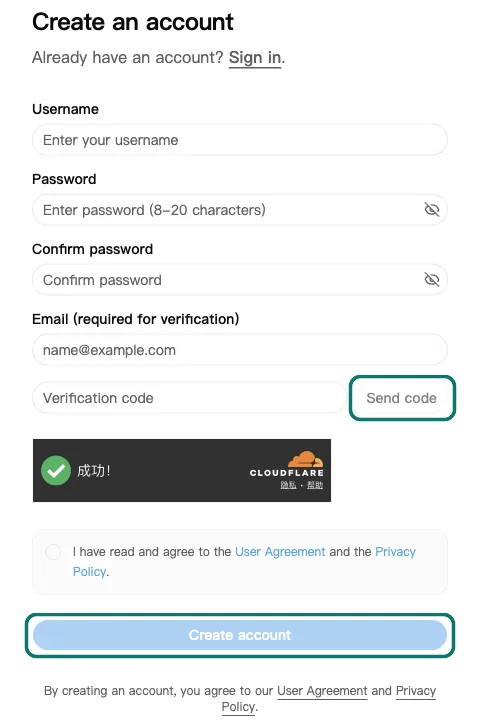
Sign-up page: click “Send code” first, then “Create account” once the code is filled in -
Add funds
New accounts currently start with US$0.05 of credit, and the key they come with is already on “Lowest price”. To make it last, start with a smaller model; see the setup guides.
After signing in, open the console and click “Wallet” in the left menu. Under “Add Funds”, choose an amount and a payment method. Your balance is in USD and you get exactly what you pay; it usually arrives within a few seconds of payment. Payment methods and limits are under Top-ups and refunds.
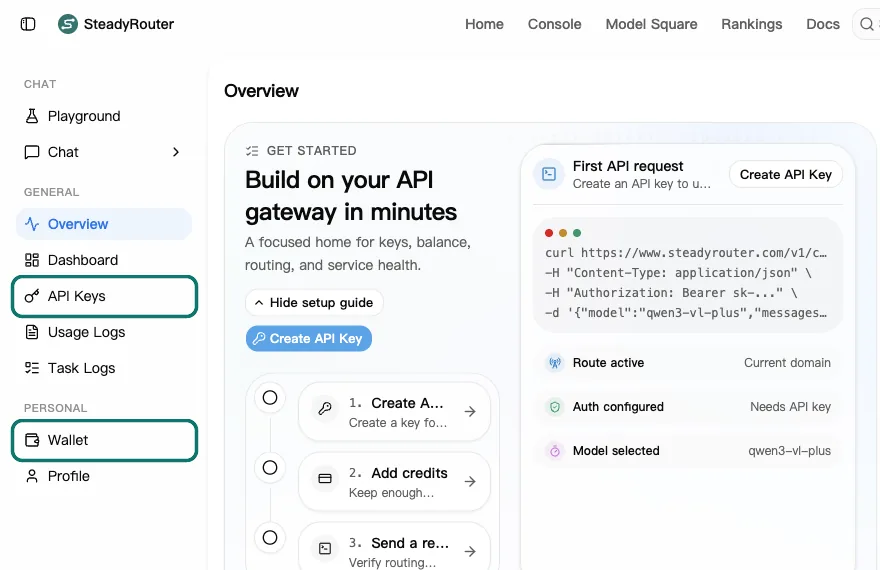
Console: “API Keys” and “Wallet” in the left menu 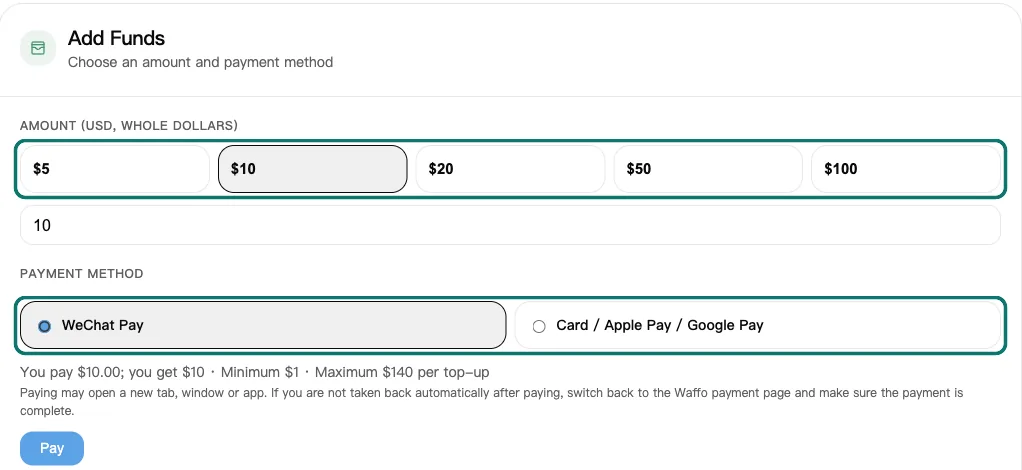
Wallet page, “Add Funds”: choose an amount and a payment method, then click “Pay” -
Get your API key
New accounts come with a key called “Default Key”, on “Lowest price” (the cheapest groups, sometimes less stable). Click “API Keys” in the console’s left menu to find it. Once you have topped up, you can switch it to “Auto” by editing it.
In the “API Key” column of the list, click the copy icon. This copies the full key (the list only shows it masked with asterisks). You can also click “⋯” at the right end of the row and choose “Copy Key”.
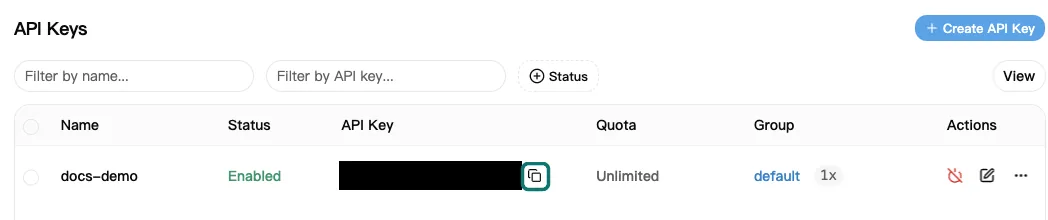
Click the copy icon next to the key (the key is blacked out in this image) Keys start with
sk-; requests work with or without this prefix. A key gives access to your balance, so never put it in front-end code or a public repository. If a key leaks, delete it under “API Keys” and create a new one.To make another key, click “Create API Key”. Enter a name, keep “Smart routing” on (a new key starts on “Auto”, or on “Lowest price” if your balance is under US$1; we rank the groups for you, and retry another group if one fails), pick another mode, or turn it off and choose groups under “Group priority” (see Models and groups), and click “Save changes”. If needed, you can set an expiration time; turn off “Unlimited Quota” to give the key a spending cap; under “Advanced Settings” you can limit which models it can use and set an IP whitelist (CIDR supported).
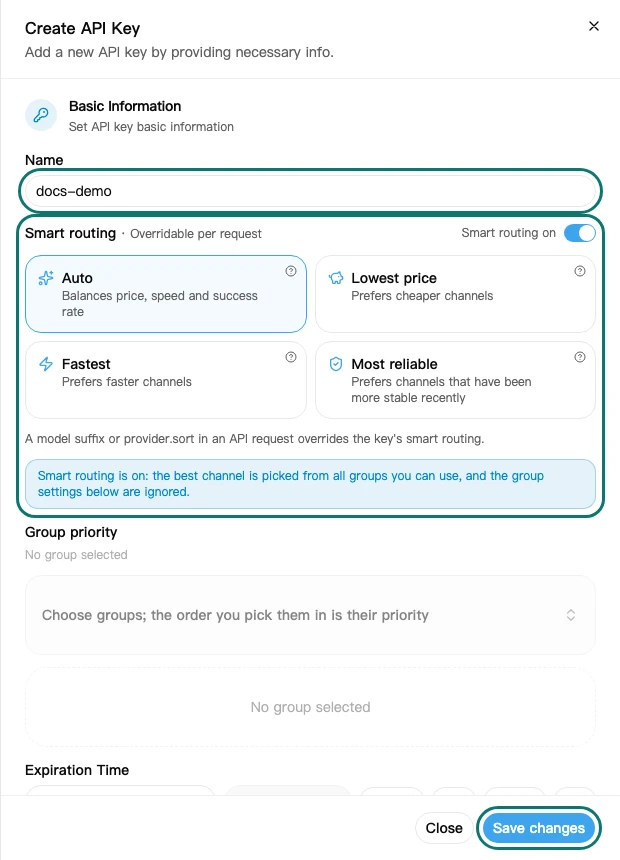
Create API Key: enter a name, keep smart routing on or choose groups yourself, and click “Save changes” -
Set the base URL
Use the address that matches the API format your code or client uses:
API format Base URL Send the key in OpenAI-compatible https://api.steadyrouter.com/v1Authorization: BearerAnthropic native https://api.steadyrouter.comx-api-keyorAuthorization: BearerGemini native https://api.steadyrouter.comx-goog-api-keyor?key=api.steadyrouter.comonly serves the API, so opening it in a browser shows 404. That is expected. -
Send your first request
Store your key in the environment variable
STEADYROUTER_API_KEY, then send a request in any of these ways:export STEADYROUTER_API_KEY="sk-..." curl https://api.steadyrouter.com/v1/chat/completions \ -H "Authorization: Bearer $STEADYROUTER_API_KEY" \ -H "Content-Type: application/json" \ -d '{ "model": "gpt-5", "messages": [{"role": "user", "content": "Hello"}] }'# pip install openai import os from openai import OpenAI client = OpenAI( base_url="https://api.steadyrouter.com/v1", api_key=os.environ["STEADYROUTER_API_KEY"], ) resp = client.chat.completions.create( model="gpt-5", messages=[{"role": "user", "content": "Hello"}], ) print(resp.choices[0].message.content)// npm install openai import OpenAI from "openai"; const client = new OpenAI({ baseURL: "https://api.steadyrouter.com/v1", apiKey: process.env.STEADYROUTER_API_KEY, }); const resp = await client.chat.completions.create({ model: "gpt-5", messages: [{ role: "user", content: "Hello" }], }); console.log(resp.choices[0].message.content);To see which models your key can use, request the model list:
curlcurl https://api.steadyrouter.com/v1/models \ -H "Authorization: Bearer $STEADYROUTER_API_KEY"


2APIs
The same key works with all three formats; use whichever your code or client already speaks. Request and response parameters match the official APIs; see the official documentation for parameter details.
OpenAI-compatible
Base URL https://api.steadyrouter.com/v1, key in Authorization: Bearer. Official docs: OpenAI API Reference.
| Endpoint | Purpose |
|---|---|
POST /v1/chat/completions | Chat, with streaming ("stream": true). When streaming, add "stream_options": {"include_usage": true} and the last chunk includes usage. Claude, Gemini and other models can also be called in this format. |
POST /v1/responses | Responses API, with streaming. |
POST /v1/embeddings | Embeddings. |
POST /v1/images/generationsPOST /v1/images/edits | Image generation and editing; see Image generation. |
POST /v1/video/generationsGET /v1/video/generations/{task_id} | Video generation, as an asynchronous task: submit, then check the result with the task ID; see the video guide. |
POST /v1/audio/speechPOST /v1/audio/transcriptions | Text-to-speech and speech-to-text. |
POST /v1/rerank | Reranking. |
GET /v1/models | Lists the models your key can use. |
Not available: file uploads (Files), Batch, Fine-tuning, Assistants.
Anthropic native (Messages)
Base URL https://api.steadyrouter.com (the SDK appends /v1/messages itself). Send the key in x-api-key or Authorization: Bearer; the anthropic-version header is optional. Official docs: Messages API.
POST /v1/messages, with streaming. The request body is passed upstream as is, including fields such ascache_controlandthinking./v1/messages/count_tokensis not available (returns 404). Claude Code falls back to an estimate when this happens, so it keeps working.- For Anthropic-specific features such as prompt caching and extended thinking, use this native format; calling Claude in the OpenAI format is only suitable for plain chat.
curl https://api.steadyrouter.com/v1/messages \
  -H "x-api-key: $STEADYROUTER_API_KEY" \
  -H "anthropic-version: 2023-06-01" \
  -H "Content-Type: application/json" \
  -d '{
    "model": "claude-sonnet-5-5",
    "max_tokens": 1024,
    "messages": [{"role": "user", "content": "Hello"}]
  }'
Gemini native
Send the key in the x-goog-api-key header or in the ?key= URL parameter. Official docs: Gemini API.
| Endpoint | Purpose |
|---|---|
POST /v1beta/models/{model}:generateContent | Generate content. |
POST /v1beta/models/{model}:streamGenerateContent?alt=sse | Streaming generation (SSE). |
GET /v1beta/models | Model list. |
curl "https://api.steadyrouter.com/v1beta/models/gemini-2.5-flash:generateContent" \
  -H "x-goog-api-key: $STEADYROUTER_API_KEY" \
  -H "Content-Type: application/json" \
  -d '{"contents": [{"role": "user", "parts": [{"text": "Hello"}]}]}'
Midjourney and Suno
Midjourney uses the endpoints starting with /mj/ (midjourney-proxy protocol, such as /mj/submit/imagine, /mj/submit/action and /mj/task/{id}/fetch); Suno uses /suno/submit/music and /suno/fetch/{id}. For both, the base URL is https://api.steadyrouter.com and the key goes in Authorization: Bearer. Both are billed per request.
3Clients
Any SDK or app that lets you set a custom base URL works.
General rule for the address: OpenAI-compatible apps that ask for the full address take https://api.steadyrouter.com/v1; some apps append /v1 themselves, and then you enter https://api.steadyrouter.com. If unsure, try one, and switch to the other if the connection test returns 404.
Step-by-step setup guides: Cherry Studio · Cline · Dify · Kilo Code · LobeHub · n8n · Open WebUI · opencode · WorkBuddy
OpenAI SDK
Change base_url to https://api.steadyrouter.com/v1 and set api_key to your key; the rest of your code stays the same. See step 5 of Quick start for an example.
Anthropic SDK
# pip install anthropic
import os
import anthropic

client = anthropic.Anthropic(
    base_url="https://api.steadyrouter.com",
    api_key=os.environ["STEADYROUTER_API_KEY"],
)
msg = client.messages.create(
    model="claude-sonnet-5-5",
    max_tokens=1024,
    messages=[{"role": "user", "content": "Hello"}],
)
print(msg.content[0].text)
// npm install @anthropic-ai/sdk
import Anthropic from "@anthropic-ai/sdk";
const client = new Anthropic({
baseURL: "https://api.steadyrouter.com",
apiKey: process.env.STEADYROUTER_API_KEY,
});
const msg = await client.messages.create({
model: "claude-sonnet-5-5",
max_tokens: 1024,
messages: [{ role: "user", content: "Hello" }],
});
console.log(msg.content[0].text);Claude Code
Set two environment variables: ANTHROPIC_BASE_URL to the address and ANTHROPIC_AUTH_TOKEN to your key.
export ANTHROPIC_BASE_URL="https://api.steadyrouter.com"
export ANTHROPIC_AUTH_TOKEN="sk-..."
claude
To make them permanent, put them in the env block of ~/.claude/settings.json. We also recommend pinning the three default model tiers to models we offer: Claude Code’s built-in defaults are not necessarily on our model list, and through a gateway, background tasks such as session titles use the main model by default, so pinning a cheaper Haiku model saves money.
{
  "env": {
    "ANTHROPIC_BASE_URL": "https://api.steadyrouter.com",
    "ANTHROPIC_AUTH_TOKEN": "sk-...",
    "ANTHROPIC_DEFAULT_OPUS_MODEL": "claude-opus-5-5",
    "ANTHROPIC_DEFAULT_SONNET_MODEL": "claude-sonnet-5-5",
    "ANTHROPIC_DEFAULT_HAIKU_MODEL": "claude-haiku-4-5-20251001"
  }
}- Which group serves Claude Code is set on the key, not here: keep smart routing on for the key, or turn it off and choose groups for the key under “API Keys” (see Models and groups). The model names above stay the same.
- After starting, run
/status; if it shows the base URLhttps://api.steadyrouter.com, you are set up. - If requests fail with 400 and the error mentions
context_managementorExtra inputs are not permitted, also set the environment variableCLAUDE_CODE_DISABLE_EXPERIMENTAL_BETAS=1. - Claude Code’s official guide: Connect Claude Code to an LLM gateway.
Codex CLI
Add a provider in ~/.codex/config.toml and put your key in the environment variable STEADYROUTER_API_KEY. Codex uses the Responses API (wire_api = "responses"). For the model name, use one of the Codex models on Model Square.
model = "YOUR_CODEX_MODEL"
model_provider = "steadyrouter"

[model_providers.steadyrouter]
name = "SteadyRouter"
base_url = "https://api.steadyrouter.com/v1"
env_key = "STEADYROUTER_API_KEY"
wire_api = "responses"
Cherry Studio and other desktop clients
In the app’s settings, add a model provider of the OpenAI type, enter your key as the API key and the address according to the general rule above, then fetch the model list or add models by hand. For Claude models you can also add a provider of the Anthropic type with the address https://api.steadyrouter.com.
4Models and groups
All models, prices and billing methods are on Model Square, so we don’t repeat them here. In code, GET /v1/models returns the models your key can use.

Groups: one model, several sources
A model can be offered in several groups. Each group is a different upstream source with its own price, feature support, speed and availability. Group names read product-source-number, for example Claude-Bedrock-01; the source part tells you the type:
| Source | Description |
|---|---|
Bedrock / Azure / VertexClaude-Bedrock-01 | Runs on a cloud provider: AWS Bedrock, Microsoft Azure or Google Vertex AI. |
CloudClaude-Cloud-01 | The official API or AWS, as stated by the supplier. |
APIOpenAI-API-01 | Official API relay, as stated by the supplier. |
CNQwen-CN-01 | Models from Chinese developers. |
MixedGemini-Mixed-01 | Mixed sources: usually cheaper, sometimes less stable. For stability-critical work, prefer cloud or API groups. |
PoolClaude-Pool-01 | Account pool: usually cheaper, sometimes less stable. For stability-critical work, prefer cloud or API groups. |
Image / MJ / MusicImage-01 | Image generation; MJ is Midjourney; Music is music generation (Suno). |
- Which groups serve your requests is set on your API key: model names in your code stay the same whichever group serves a request, and a request can also ask for a routing mode (see “Choosing the mode per request” below). Model Square shows each group's price and its availability over the last 24 hours.
- The key a new account comes with has “Smart routing” on, in the “Lowest price” mode; keys you create have it on too, in the “Auto” mode (or “Lowest price” if your balance is under US$1). With smart routing on, the gateway ranks the groups that offer the model and tries them in that order: if a group fails (other than a 408, 504 or 524 timeout), the request is retried in the next group within the same call, up to 5 groups. A 400 error from upstream is retried in at most one more group, at another upstream site; if that fails too, you get the first error back. “Auto” puts cloud and
APIgroups first,CN,Mixedand image groups next andPoolgroups last, and within each of these ranks by recent success rate, price and speed. “Lowest price”, “Fastest” and “Most reliable” rank all groups by that one measure, so aPoolgroup can come first. In every mode, a group that failed at least half of 3 or more attempts in the last 30 minutes moves to the end: it is tried only if the others fail. - To choose the groups yourself, turn smart routing off and add groups under “Group priority”: requests use only those groups, in your order, and move to the next one when a group fails. With a single group, requests go to that group only, and the error is returned when it fails. If a group does not suit you, replace it on your key.
- The Failover tag on Model Square means the model is offered in groups from at least two independent suppliers. A request moves to another group when one fails only if smart routing is on or the key has two or more groups under “Group priority”; a key with a single group does not switch.
- Groups differ in feature support (for example prompt caching), speed and output quality, and which group you use is your choice. For stability-critical work, use only cloud or
APIgroups: turn smart routing off and list only such groups under “Group priority” (in every smart routing mode,PoolandMixedgroups can be used). - Every day we check, from real traffic, that each group returns the model you requested.
- The
modelfield in the response is the name returned upstream and may include a date version. That is normal; billing uses the model name you requested. - Prices change, up or down, when our costs from upstream suppliers change, sometimes several times a day. Each request is charged at the price in effect when it is made, for the group that served it.
Choosing the mode per request
A request can ask for a smart routing mode itself, which overrides the key's mode; :floor, :nitro and provider.sort are written the same way as on OpenRouter.
- Model name suffix:
:flooror:pricefor “Lowest price”,:nitroor:speedfor “Fastest”,:stableor:success_ratefor “Most reliable”, for example"model": "gpt-5:floor". - Or in the request body:
"provider": {"sort": "price"}, withprice,speed(alsothroughputorlatency) orsuccess_rate. If both are given, the suffix wins. Otherprovideroptions are not supported. - With smart routing on, this reorders the same groups; with your own group list, it reorders only the groups in your list. The gateway removes the suffix and the
providerfield first, so billing and the upstream see the plain model name. It works for JSON request bodies: image edits sent as multipart form data do not accept a suffix (the request fails as an unknown model), and on Gemini-native paths, where the model is in the URL, onlyprovider.sortcounts.
5Billing
Prepaid, with the balance in USD. Each request is charged from your balance at the price listed on Model Square at that time for the group that served it, in one of two ways:
| Method | How it is calculated |
|---|---|
| Per token | Input and output are priced separately. Models with caching also have “cache read” and “cache write” prices. |
| Per request | Image generation, Midjourney, Suno and similar have one price per request. Generating n images counts as n requests, regardless of size and quality. |
How caching is billed
Cache reads and cache writes are billed at the cache read and cache write prices, based on the token counts in the response’s usage; the rest of the input is billed at the normal input price. The fields in each format:
- OpenAI format:
usage.prompt_tokens_details.cached_tokens - Anthropic format:
usage.cache_read_input_tokens(read),usage.cache_creation_input_tokens(write) - Gemini format:
usageMetadata.cachedContentTokenCount
When you are not charged
- Requests that return an error are not charged, except that some upstream rejections for breaking content rules carry a violation fee.
- When the gateway retries a request in another group, the attempts that failed and were retried are not charged.
Checking usage and controlling spend
- Console → “Usage Logs” shows the model, group, token counts, cost and request ID of every request.
- Once your balance runs out, requests return 403 (
insufficient_user_quota); they work again as soon as you top up. - A spending cap on a key keeps any one program from using up your balance.
6Rate limits and errors
Rate limits
- Each account can send at most 300 requests per minute, failed requests included. All keys in the same account share this limit. Requests over it return 429.
- The model list (
GET /v1/models), Midjourney and Suno endpoints do not count. - If you need higher concurrency, email support@steadyrouter.com.
Error format
Errors generated by the gateway itself use the format below (on the Anthropic and Gemini endpoints too). Some error messages are in Chinese, so have your code check the HTTP status code and error.code.
{
  "error": {
    "code": "model_not_found",
    "message": "分组 auto 下模型 no-such-model 无可用渠道(distributor) (request id: 20261008...)",
    "type": "new_api_error"
  }
}
Every response carries the response header X-Oneapi-Request-Id, and error messages end with (request id: …). Include it when you contact us so we can find that request.
Status codes and whether to retry
| Status | Common causes | Retry? |
|---|---|---|
| 400 | The request body is not valid JSON, or a parameter is not accepted upstream. | No; fix the request first. |
| 401 | No key, a wrong key, or a key that is disabled, expired or out of quota (all return Invalid token). | No; check this key under “API Keys”. |
| 403 | Insufficient account balance (insufficient_user_quota), an IP that is not on the key’s whitelist, or a disabled account. | No; resolve the cause, then try again. |
| 404 | A wrong address, or an endpoint that is not available (such as /v1/messages/count_tokens or Files). | No; check the base URL and path. |
| 429 | Over the account’s per-minute rate limit, or the upstream is rate-limiting (with smart routing on, or several groups on the key, other groups are tried first). | Yes; wait a few seconds and retry, waiting longer each time. |
| 500 | A server or upstream error. Note: a 500 whose error.code is invalid_request actually means the request is missing a field (for example, no messages). | Yes; but not for invalid_request, fix the request first. |
| 502 / 504 | Upstream connection error or timeout. | Yes. |
| 503 | model_not_found: the model name is wrong, the model is not listed, or the groups your key uses do not offer it. Other 503s: the upstream is temporarily unavailable. | Not for model_not_found; check the model name and your key’s group. Yes for the others. |
Retry advice: retry only 429 and 5xx, waiting longer each time (for example 1, 2 and 4 seconds), at most 3 times. With smart routing on, or several groups on the key, the gateway has already tried other groups before returning an error, with two exceptions: 408, 504 and 524 timeouts are not moved to another group, so it is up to you whether to retry them, and a 400 error from upstream is retried in at most one more group, at another upstream site. After repeated failures, switch your key to another group, try another model or try again later.
Timeouts
We do not limit the total duration of a request; a streaming request is closed after 600 seconds without any data. Non-streaming requests such as long reasoning or image generation can take a while, so set your client timeout to 300 seconds or more; use streaming for requests with long output where you can.
7Image generation
Which endpoint
- Most image models use
POST /v1/images/generations(text to image); image editing usesPOST /v1/images/edits(a multipart form that uploads the source image). - Gemini models with
imagein their name are called through the chat endpointPOST /v1/chat/completions. - For Midjourney (
mj_*), see APIs.
curl https://api.steadyrouter.com/v1/images/generations \
  -H "Authorization: Bearer $STEADYROUTER_API_KEY" \
  -H "Content-Type: application/json" \
  --max-time 300 \
  -d '{
    "model": "doubao-seedream-3-0-t2i-250415",
    "prompt": "a red apple on a white table, minimal product photo",
    "size": "1024x1024",
    "n": 1
  }'
Size and quality
Pass size, quality, n and other parameters as the model vendor defines them; the gateway forwards them upstream as is. The vendor’s documentation decides which sizes and quality levels each model supports, for example OpenAI’s Images API.
The resolution and quality an image model actually delivers can differ between groups. If a group does not give you what you need, switch your key to another group.
Response format
Some models return b64_json (the image in base64), others return url (a temporary link that expires, so download and save it promptly). Handle both.
Duration and timeouts
The image endpoints are not streaming: they return once the whole image is generated. A single image usually takes tens of seconds; the longest we have measured is about 135 seconds. Set your client timeout to at least 180 seconds, ideally 300; we will not close the connection early.
Billing
Per-request models have one price per image, regardless of size and quality. For per-token models (such as the gpt-image series), larger sizes and higher quality mean more output tokens and a higher cost. Failed generations are not charged, except that some upstream rejections for breaking content rules carry a violation fee.
8Top-ups and refunds
Top up under “Add Funds” on the console’s “Wallet” page, in whole US dollars. There are no fees: your balance goes up by exactly the amount you pay.
| Payment method | Per top-up |
|---|---|
| Card / Apple Pay / Google Pay | US$10 – US$500 |
| WeChat Pay | US$1 – about US$140 |
- During the first 7 days after sign-up, a new account can top up at most US$50 per day in total by card, Apple Pay or Google Pay. WeChat Pay is not subject to this limit.
- Paying may open a new tab, window or app. If you are not taken back automatically after paying, switch back to the payment page and make sure the payment is complete.
- Your balance does not expire. It can only be used on this site and cannot be withdrawn or transferred to another account.
Refunds
- Unused balance: within 7 days of a top-up, you can ask for a refund of the part of it you have not used. Usage is counted against your oldest top-up first. The refund goes to the original payment method, minus the payment processing fee on that amount and the US$1 fee the payment provider charges for each refund; if nothing is left after these fees, no refund is issued.
- Used balance is not refundable. Credit received for free, through promotions or from redemption codes is not refundable.
- Billing errors: send us the request ID of that request; once we confirm the error, we credit the full amount back to your balance.
- Refunds can only be requested by email: write to support@steadyrouter.com from the email address on your account, or include your username. See section 3 of the Terms of Service for the full terms.
9Contact us
For accounts, billing, refunds, billing errors or reporting abuse, email support@steadyrouter.com.
- Write from the email address on your account, or include your username.
- For a specific request, include its request ID, time and model.
- Never send us your API key; we will never ask you for one.